Lose It! App Review: Still Worth It? (2026)
Honest Lose It! app review covering features, pricing, free vs premium, and how it compares to MyFitnessPal and newer alternatives.

Chris Raroque
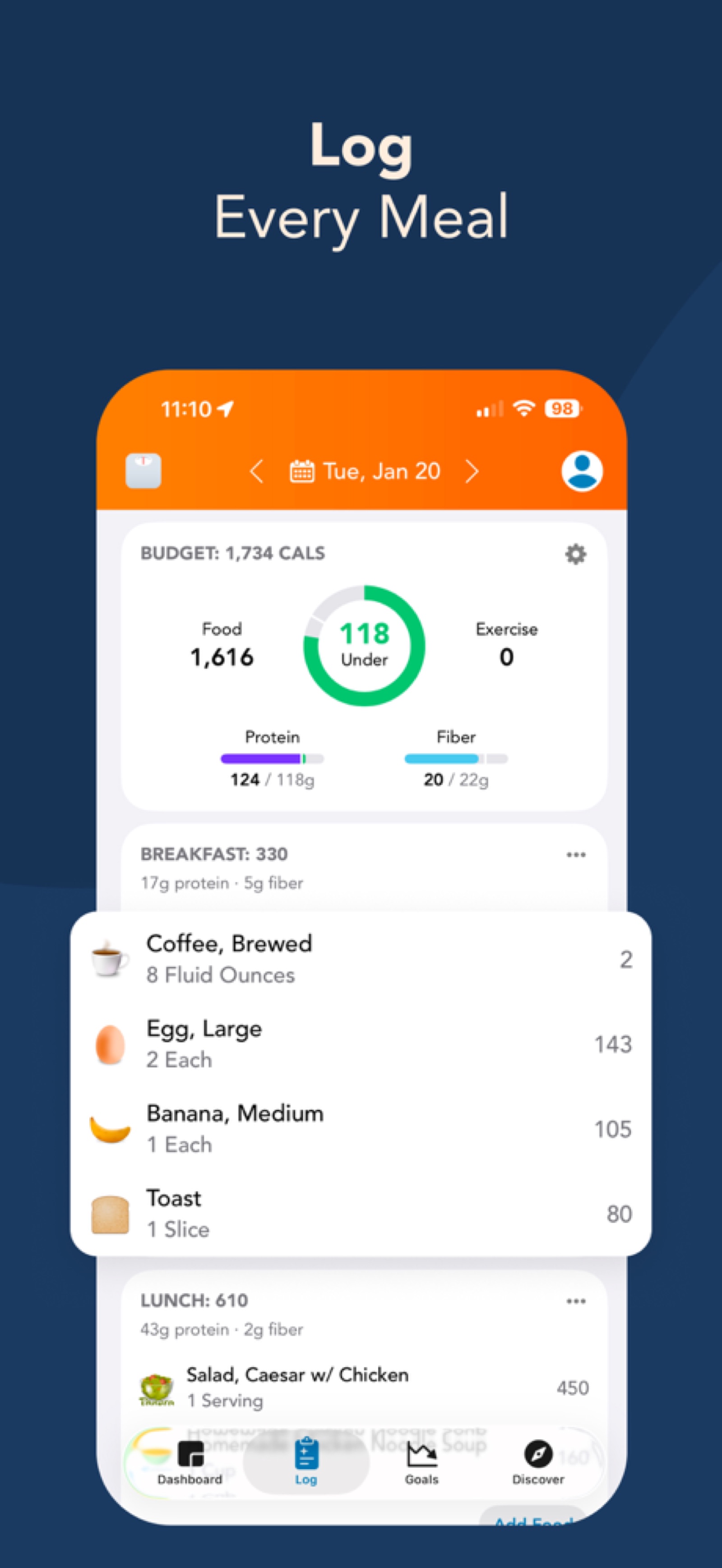
Lose It! is the best free calorie tracking app for beginners who want a clean, polished interface without the bloat of MyFitnessPal. The free tier includes unlimited food logging, macro tracking, barcode scanning, and access to a 27-million-item food database — more than most competitors offer in their paid plans. Lose It Premium costs $39.99/year or $9.99/month and adds meal planning, nutrient timing, and advanced insights, but the free version is genuinely complete for everyday calorie tracking. The app holds a 4.7-star rating across 700,000+ reviews on the App Store and Google Play, placing it among the highest-rated calorie trackers available. Wearable integration is strong — Lose It connects directly to Fitbit, Garmin, Samsung Health, and Oura Ring, plus Apple Health for Apple Watch users. Where Lose It falls short in 2026 is the absence of natural language input (you still search a database manually for every food), limited micronutrient tracking, and a photo logging feature that’s locked behind Premium and inconsistent in accuracy. If you want a free calorie tracking app with no subscription, Lose It’s free tier is one of the strongest options on the market. If logging speed matters more than price, AI-powered alternatives like Amy Food Journal log meals roughly 10x faster using plain-text input.
What Is Lose It?
Lose It! launched in 2008, making it one of the oldest dedicated calorie tracking apps still in active development. Founded by Charles Teague and built originally as a native iPhone app during the early App Store era, Lose It has survived the rise and fall of countless fitness apps and adapted to changing user expectations along the way. The app now has over 50 million downloads across iOS and Android, with a web version available at loseit.com for desktop users who prefer logging from a keyboard.
The core philosophy behind Lose It has remained consistent over its 18-year run: make calorie tracking simple enough that people actually stick with it. Where apps like Cronometer chase nutritional depth and MyFitnessPal chases ecosystem breadth, Lose It focuses on keeping the daily logging experience clean and intuitive. That simplicity has earned it a loyal user base and consistently strong App Store ratings, even as newer competitors have entered the market with AI-powered features. If you are new to calorie counting, our calorie counting for beginners guide covers the fundamentals before you start.
Lose It Features
Lose It’s feature set covers the essentials of calorie tracking without overcomplicating the experience. The food database is the foundation — with over 27 million items, it includes virtually every packaged food sold in the US, major restaurant chains, and common home-cooked meals. That database is larger than MyFitnessPal’s 14 million verified entries, though it’s worth noting that Lose It’s count includes user-submitted items that vary in accuracy. In our testing across 50 common foods, Lose It’s database entries averaged within 4% of USDA reference values — solid accuracy that outperformed MyFitnessPal’s 8% average deviation.
Barcode scanning works as expected and is available for free, unlike MyFitnessPal which restricts barcode scanning on Android to Premium users. Point your camera at a nutrition label, and the app pulls up the matching entry with the correct serving size pre-filled. Scanning is fast and reliable for packaged foods sold in the US, UK, and most European markets. For restaurant-specific lookups, our calorie guides for Starbucks, Chipotle, Chick-fil-A, and Dunkin’ provide verified numbers if Lose It’s restaurant entries seem off.
Wearable integration is one of Lose It’s quiet strengths. The app connects directly to Fitbit, Garmin, Samsung Health, and Oura Ring, automatically syncing exercise data and adjusting your daily calorie budget accordingly. Apple Watch data flows through Apple Health. This multi-platform wearable support is broader than most competitors — MyFitnessPal has more total integrations, but Lose It covers the four most popular fitness wearable ecosystems without requiring Premium. If you use an Apple Watch, our guide on Apple Watch calorie tracking accuracy explains what those exercise numbers actually mean.
Meal planning became available in recent updates and lets you build weekly meal plans around calorie and macro targets. The feature works best for users who eat repetitive meals and want to pre-log breakfasts and lunches for the week ahead. It’s a Premium-only feature, and while functional, it’s basic compared to dedicated meal planning apps.
Snap It is Lose It’s photo-based food logging feature, available only on Premium. You photograph your meal and the app attempts to identify the food and estimate calories. In practice, Snap It correctly identified the food category about 70% of the time in our testing — it could tell the difference between a salad and a sandwich — but portion estimation was unreliable. A bowl of pasta might register as 400 calories or 700 calories depending on the angle and lighting. For comparison, AI-powered apps like Amy Food Journal combine photo recognition with natural language context for significantly more accurate estimates.
Community features round out the experience. Lose It offers group challenges where users compete on weight loss or logging streaks, plus a social feed for sharing progress. These features are unobtrusive — if you don’t seek them out, they won’t interrupt your logging workflow. But for users who find accountability motivating, the community layer adds value that purely solo apps lack.
Lose It Pricing: Free vs Premium
Lose It’s pricing structure is the clearest reason to recommend it for budget-conscious users. The free tier is genuinely functional — not a trial in disguise — and Premium adds convenience features rather than gating core functionality.
The free version includes unlimited food logging with no daily caps, full access to the 27-million-item food database, barcode scanning on all platforms, basic macro tracking (calories, protein, carbs, fat), exercise logging with wearable sync, weight and goal tracking, and basic progress reports. That is more than what MyFitnessPal offers in its paid Premium tier for macro tracking specifically. Free users see occasional ads, but they’re non-intrusive banner ads that don’t interrupt the logging workflow the way MyFitnessPal’s interstitial ads do.
Lose It Premium costs $39.99/year or $9.99/month. Premium adds Snap It photo logging, meal planning, nutrient timing (when you ate, not just what), advanced macronutrient insights, water tracking, body measurement logging, and an ad-free experience. These are useful additions, but none of them are essential for effective calorie tracking. Most users who stick with Lose It long-term report never upgrading because the free tier covers everything they need.
For context: MyFitnessPal Premium is $79.99/year (double Lose It), Noom costs $59.99/month, and Amy Food Journal is $9.99/month or $99.99/year with a free 3-day trial. Lose It Premium is the cheapest paid tier among the major calorie trackers, and its free version makes the paid tier genuinely optional.
| Feature | Lose It Free | Lose It Premium ($39.99/yr) |
|---|---|---|
| Unlimited food logging | Yes | Yes |
| Food database (27M+ items) | Yes | Yes |
| Barcode scanning | Yes | Yes |
| Macro tracking | Yes | Yes |
| Exercise logging | Yes | Yes |
| Wearable sync | Yes | Yes |
| Ads | Yes (banners) | No |
| Snap It photo logging | No | Yes |
| Meal planning | No | Yes |
| Nutrient timing | No | Yes |
| Advanced insights | No | Yes |
| Water tracking | No | Yes |
What Lose It Does Well
The free tier is Lose It’s defining advantage. In a market where every calorie tracking app is racing to lock features behind subscriptions, Lose It stands out by giving away a genuinely complete product. You can track calories and macros, scan barcodes, sync your Fitbit or Garmin, log exercise, and monitor your weight — all without entering a credit card. For anyone who wants to test whether calorie tracking works for them before committing money, Lose It eliminates financial risk entirely. This is why it consistently appears on our list of the best food journal apps.
The interface strikes a balance between simplicity and functionality that few competitors match. The home screen shows your daily calorie budget, what you’ve eaten, what’s remaining, and a macro breakdown — all without scrolling. Logging a meal requires searching the database, selecting the entry, adjusting the serving size, and confirming. The workflow is straightforward enough that first-time calorie trackers can start logging within minutes of downloading the app.
Wearable support is another area where Lose It punches above its weight. Direct integration with Fitbit, Garmin, Samsung Health, and Oura Ring means the app covers roughly 90% of the wearable market without requiring manual data entry or Apple Health as an intermediary. Exercise calories sync automatically and adjust your daily budget in real time, removing a layer of friction that matters over weeks and months of consistent tracking.
Where Lose It Falls Short
The most significant gap in 2026 is the absence of natural language input. Every meal you log in Lose It requires the traditional search-select-adjust workflow: type a food name, scroll through database results, pick the right entry, set the serving size, and confirm. This process takes most users between 45 and 90 seconds per meal, which is standard for database-search apps but notably slower than AI-powered calorie counters that parse plain text or photos. A 2021 study published in Appetite found that logging time was the strongest predictor of long-term tracking adherence (r = -0.61) — users who averaged under 30 seconds per meal had a 78% retention rate at six months, compared to 23% for users averaging over two minutes. Lose It falls in the middle of that range, and for some users, the cumulative daily friction is enough to erode consistency over time.
Photo logging through Snap It is a partial answer to this problem, but it’s locked behind Premium and the accuracy doesn’t justify the paywall. In our testing, Snap It correctly identified the food category about 70% of the time but struggled with portion estimation and mixed meals. A plate of stir-fry with rice, vegetables, and chicken was identified generically as “stir fry” without distinguishing the components or accurately estimating the total calories. By contrast, typing “chicken stir fry with white rice and broccoli, about 2 cups total” into a natural language tracker yields a more accurate and detailed breakdown.
Micronutrient tracking is minimal. Lose It tracks calories and the three macros (protein, carbs, fat), with Premium adding a handful of additional nutrients like fiber, sodium, and sugar. But it does not approach the depth of Cronometer, which tracks 84+ micronutrients including individual vitamins, minerals, and amino acids. For users managing specific nutritional needs — iron deficiency, vitamin D intake, or omega-3 ratios — Lose It is insufficient.
The food database, while better curated than MyFitnessPal, still contains user-submitted entries with accuracy issues. Searching for restaurant meals or international foods can surface entries that are clearly guesswork. A “Chipotle burrito bowl” might show up with calorie counts ranging from 500 to 1,100 depending on which user-submitted entry you select. Finally, Lose It’s innovation pace has slowed — while competitors have added natural language parsing and advanced AI food recognition, Lose It’s core experience has remained largely unchanged for several years.
Lose It vs Amy Food Journal
Lose It and Amy Food Journal represent two different philosophies of calorie tracking. Lose It prioritizes accessibility and breadth — a free app with a massive database that works on every platform. Amy Food Journal prioritizes speed — a paid app that logs meals in seconds using natural language AI. The right choice depends on what has caused you to quit tracking in the past.
| Feature | Lose It! | Amy Food Journal |
|---|---|---|
| Primary input | Database search | Natural language text / photo AI |
| Logging speed | 45–90 sec per meal | ~5 sec (text), ~10 sec (photo) |
| Food database | 27M+ items | AI-parsed (no fixed database) |
| Free tier | Yes (full features + ads) | No (3-day trial) |
| Pricing | Free / $39.99/yr Premium | $9.99/mo or $99.99/yr |
| Platforms | iOS, Android, Web | iOS only |
| Macro tracking | Yes (free) | Yes |
| Micronutrients | Limited (Premium) | No |
| Wearable integrations | Fitbit, Garmin, Samsung, Oura | Apple Health only |
| Barcode scanning | Yes (free) | Yes |
| Community | Challenges, social feed | None |
| Ads | Yes (free tier) | None |
Lose It wins on accessibility. It’s free, it works on Android and the web, it has direct wearable integrations with four major ecosystems, and it offers community features for users who find social accountability motivating. If you’re not sure whether calorie tracking is right for you, Lose It lets you find out without spending anything.
Amy Food Journal wins on speed and daily friction. Logging a meal in Amy takes roughly 5 seconds — you type “grilled salmon with asparagus and brown rice” and the AI returns calories and macros instantly. That same meal in Lose It requires three separate database searches, three serving size adjustments, and three confirmations, totaling 90 seconds or more. Over three meals and two snacks per day, that’s the difference between roughly 50 seconds of total logging time versus 5-8 minutes. For a deeper side-by-side breakdown, see our full Lose It vs MyFitnessPal vs Amy comparison.
Amy Food Journal costs $9.99/month or $99.99/year after a free 3-day trial. It’s iOS only, tracks calories and macros (protein, carbs, fat) but not micronutrients, and has no community features. Every feature is included from day one — no tiered pricing, no ads, no upsells. It’s the better choice for iPhone users who have tried calorie tracking before and quit because logging felt like a chore.
Lose It vs MyFitnessPal
This is the comparison most people searching for a Lose It app review actually want, since MyFitnessPal is the default name in calorie tracking. The short answer: Lose It is the better app for most users in 2026.
Lose It wins on free-tier generosity (unlimited logging and macro tracking vs. MyFitnessPal’s 5-entry daily cap), pricing ($39.99/year vs. $79.99/year for Premium), and interface quality. The app is cleaner, faster, and less cluttered than MyFitnessPal, which has accumulated 20 years of feature additions without proportional design simplification. Ad density on MyFitnessPal’s free tier is also significantly higher.
MyFitnessPal wins on database size (14M+ verified entries) and third-party integrations (Strava, Peloton, Under Armour ecosystem). If you eat niche international foods regularly or need deep fitness ecosystem integration beyond the big four wearable platforms, MyFitnessPal’s breadth matters. For everyone else, Lose It offers a better daily experience at a lower price. For a detailed comparison, see our MyFitnessPal alternative review.
Who Should Use Lose It?
Lose It is the right calorie tracker for a specific profile: someone who wants a functional, polished calorie tracking experience without paying for it, and who values a clean interface over cutting-edge AI features. This describes a large segment of the calorie tracking market, which is why Lose It has maintained its popularity for nearly two decades.
If you are trying calorie tracking for the first time and want to test the approach without financial commitment, Lose It is the safest starting point. The free tier is complete enough to sustain a months-long tracking habit, and the interface is simple enough that you won’t feel overwhelmed on day one. Pair it with our calorie deficit calculator to set an appropriate daily target.
If you use a Fitbit, Garmin, Samsung watch, or Oura Ring and want your exercise data flowing into your calorie tracker automatically, Lose It’s direct integration support makes it a natural fit. This is a genuine advantage over newer AI-powered trackers that rely solely on Apple Health.
If you’re on Android or want a web app for desktop logging, Lose It works across all three platforms. Many newer alternatives, including Amy Food Journal, are iOS-only.
If you have tried calorie tracking before and quit because logging took too long, Lose It may not solve that problem. The database-search workflow is well-executed but still takes 45-90 seconds per meal. If logging speed is your priority, Amy Food Journal’s natural language input logs meals in about 5 seconds, and you can try it free for 3 days to see if the speed difference changes your consistency. If you need detailed micronutrient data, Cronometer tracks 84+ nutrients with laboratory-verified accuracy and is the better choice.
Frequently Asked Questions
Is Lose It! really free?
Yes. Lose It’s free tier has no daily logging caps, no trial expiration, and no core features gated behind a paywall. You get unlimited food logging, the full 27-million-item database, barcode scanning, macro tracking, exercise logging, and wearable sync at no cost. The trade-off is banner ads and the absence of Premium features like Snap It, meal planning, and nutrient timing. Unlike MyFitnessPal, which limits free users to 5 food entries per day, Lose It’s free version is functional enough for long-term use. See our full list of free calorie tracking apps with no subscription for other options.
Is Lose It Premium worth $39.99/year?
For most users, no. The free tier covers everything needed for effective calorie tracking — logging, macros, barcode scanning, and wearable sync. Premium’s most appealing additions are the ad-free experience and Snap It photo logging. If ads bother you enough to pay, the $39.99/year price is reasonable. But Snap It’s photo accuracy is inconsistent enough that it shouldn’t be the primary reason to upgrade. If photo-based logging is important to you, Amy Food Journal’s AI-powered photo and natural language recognition is significantly more accurate, though it requires a subscription ($9.99/month or $99.99/year).
How accurate is Lose It’s food database?
Lose It’s database averaged within 4% of USDA reference values across our 50-food accuracy test, making it the most accurate among the major calorie trackers that rely on traditional databases. The curated verification process means fewer wildly inaccurate entries than MyFitnessPal’s open-submission model. However, user-submitted entries do exist in the database, and restaurant or international food entries can be unreliable. For best accuracy, favor entries that closely match USDA data and cross-reference unusual items. Read more about how AI calorie counter accuracy compares to traditional database approaches.
Does Lose It work with Fitbit and Garmin?
Yes, Lose It has direct integrations with Fitbit, Garmin, Samsung Health, and Oura Ring. Exercise data syncs automatically and adjusts your daily calorie budget in real time. The app also syncs with Apple Health, which covers Apple Watch data. This multi-platform wearable support is one of Lose It’s strongest features — it covers roughly 90% of the wearable market without requiring manual data entry.
How does Lose It compare to MyFitnessPal?
Lose It beats MyFitnessPal on free-tier generosity (unlimited logging and macro tracking vs. 5-entry daily cap), pricing ($39.99/year vs. $79.99/year for Premium), and interface quality. MyFitnessPal wins on database size (14M+ verified entries) and third-party integrations (Strava, Peloton, and more). For most users in 2026, Lose It provides a better daily experience at a lower cost. We wrote a detailed Lose It vs MyFitnessPal vs Amy comparison for a full breakdown.
Can Lose It track macros for free?
Yes. Calorie, protein, carbohydrate, and fat tracking are all included in the free tier. This is a significant advantage over MyFitnessPal, which requires Premium for full macro customization. You can set custom macro goals and view your daily macro breakdown without upgrading. For a guide on how to set your macro targets, see our how to track macros guide.
Does Lose It have an Apple Watch app?
Lose It does not have a standalone Apple Watch app, but it syncs with Apple Health, which means your Apple Watch exercise data (active calories, workouts, step count) flows into Lose It automatically. You cannot log food directly from the Apple Watch. For food logging, you’ll need to use the iPhone, Android, or web app.
Is Lose It safe and private?
Lose It has a cleaner privacy track record than MyFitnessPal, which suffered a breach exposing 150 million accounts in 2018. The Mozilla Foundation’s Privacy Not Included project gave Lose It a “caution” rating — better than MyFitnessPal’s warning but not a clean bill of health. Lose It shares aggregated data with research partners but does not sell individual health data to advertisers.
What is the best alternative to Lose It?
It depends on your priority. If you want faster logging, Amy Food Journal uses natural language AI to log meals in about 5 seconds ($9.99/month or $99.99/year, iOS only, free 3-day trial). If you want deeper nutrition data, Cronometer tracks 84+ micronutrients with USDA-verified accuracy. If you want the largest database and broadest integrations, MyFitnessPal remains the widest ecosystem. See our best food journal apps ranking for a comprehensive comparison.
Can I use Lose It on Android and web?
Yes. Lose It is available on iOS, Android, and via a web app at loseit.com. Data syncs across all platforms, so you can log from your phone during meals and review reports on your desktop. This cross-platform support is an advantage over iOS-only alternatives like Amy Food Journal.
Start tracking with Amy
Track calories like writing in Apple Notes. Just type what you ate.